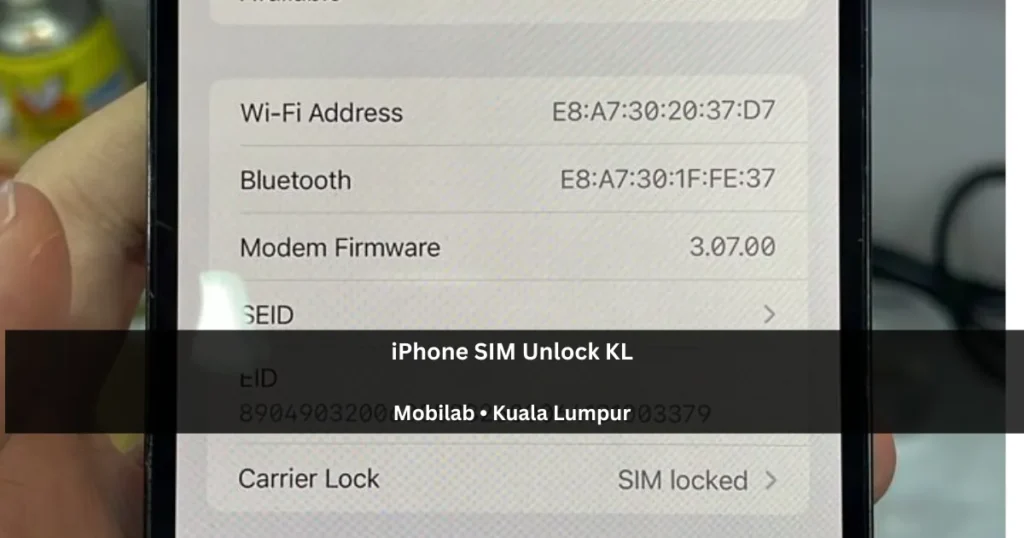
If you need iPhone SIM unlock Malaysia service because your foreign iPhone cannot use a local SIM card, the phone may be carrier locked. This is common with some overseas iPhones, especially LL set or US set units that were originally sold under a carrier plan.
In Malaysia, a SIM locked iPhone may turn on normally, connect to Wi-Fi, and look perfectly usable, but it may not work properly with Maxis, CelcomDigi, U Mobile, Unifi Mobile, Tune Talk, Yes, or other local SIM cards. For many customers, the problem only becomes obvious after inserting a Malaysian SIM and seeing that the iPhone still cannot activate mobile service.
MobiLab can check foreign iPhones in Kuala Lumpur and Selangor, explain the lock status, and advise whether the device is suitable for SIM unlock service. When the unlock is successful and the device is supported, the iPhone can be used with compatible Malaysia SIM cards and many international carriers, depending on the model, carrier status, and network band support.
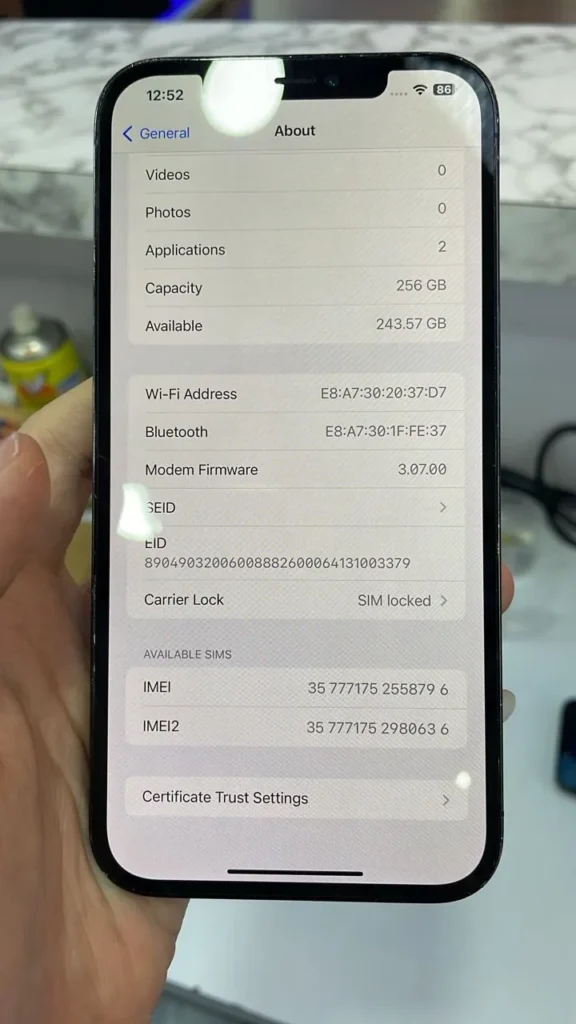
What Does SIM Locked Mean on an iPhone?
SIM locked means the iPhone is restricted to a specific network provider or carrier. The phone may still work with Wi-Fi, apps, camera, and other normal features, but the mobile network function is limited. If the inserted SIM card is not accepted by the original carrier lock, the iPhone may not get normal signal or may show carrier-related restrictions.
On newer iOS versions, you can often check this by going to Settings > General > About. If the phone shows SIM locked or Carrier Lock: SIM locked, it means the iPhone is not fully open for all SIM cards.
After a successful supported unlock, the same section may show No SIM restrictions. This is the status many customers want to see because it means the iPhone is no longer locked to one carrier.
Why LL Set or US Set iPhones May Not Work Properly in Malaysia
Many iPhones sold in Malaysia are already factory unlocked, so they can accept different local SIM cards. However, some foreign iPhones are different. An LL set usually refers to a US market iPhone. Some US iPhones are sold through carriers, installment plans, contract deals, trade-in programs, or network promotions.
If the iPhone is still locked to a US carrier, a Malaysian SIM card may not work even though the phone itself is genuine. This can happen when a customer buys a second-hand iPhone, receives a phone from overseas, imports a cheaper unit, or purchases a device without checking the carrier lock status first.
This is why checking the iPhone before buying or before repair is important. A beautiful iPhone with high storage, good battery health, and clean body condition may still be difficult to use in Malaysia if the carrier lock is not solved.
Who Can Authorise an iPhone Carrier Unlock?
Apple’s official unlock guidance states that only your current network provider can unlock the iPhone. Contact that provider to check eligibility and its requirements. MobiLab can help assess the lock status and explain supported options; an official carrier unlock remains subject to the provider’s approval.
How MobiLab Assesses a SIM Locked Foreign iPhone
MobiLab can check SIM locked foreign iPhones and advise whether the device is suitable for unlock service. This includes many customer cases involving LL set, US set, and other overseas iPhones that cannot use Malaysian SIM cards normally.
The correct answer depends on the actual device. SIM lock cases are not all the same. The technician may need to check the iPhone model, iOS status, IMEI condition, carrier lock screen, eSIM or physical SIM status, and whether the phone has other issues such as iCloud lock, Apple ID lock, lost mode, blacklist status, or hardware network problems.
MobiLab will explain the situation before proceeding. If the iPhone is suitable and the unlock is successful, the goal is to change the carrier lock status so the device can use compatible SIM cards locally and overseas. However, the final result should only be confirmed after checking the actual phone.
SIM Unlock Is Not the Same as iCloud Unlock
This is an important point because many customers mix up the terms.
SIM lock is related to the mobile network provider. A SIM locked iPhone may be usable on Wi-Fi but cannot accept certain SIM cards.
iCloud lock or Activation Lock is related to the Apple ID previously linked to the iPhone. That is a different security feature and should not be treated as the same service.
MobiLab does not accept stolen devices, lost mode cases, iCloud lock, Apple ID lock, or blacklist cases for iPhone SIM unlock service. This service is for suitable carrier lock cases after the phone has been checked.
If you are not sure what type of lock your iPhone has, take a clear photo of the screen and send it to MobiLab through WhatsApp. The technician can usually tell whether it looks like SIM lock, iCloud lock, screen lock, eSIM issue, or another network-related problem.
What MobiLab Checks Before iPhone SIM Unlock Service
Before accepting an iPhone SIM unlock case, MobiLab will usually check the device condition and the lock status first. This helps avoid wrong diagnosis and unnecessary work.
The checking may include:
- Whether the iPhone shows SIM locked or No SIM restrictions
- Whether the phone is an LL set, US set, or other foreign model
- Whether the iPhone supports Malaysia network bands
- Whether the device uses physical SIM, eSIM, or both
- Whether there are signs of iCloud lock, Apple ID lock, lost mode, blacklist, or suspicious status
- Whether the phone has signal, baseband, modem firmware, or motherboard issues
- Whether the case is suitable for iPhone SIM unlock service after checking
A carrier lock and a hardware network fault can both leave a phone without service, but they require different solutions. Our Honor 200 Pro no-service case illustrates a motherboard fault on an Android phone; it is not an iPhone unlock case. MobiLab checks the cause before recommending work.
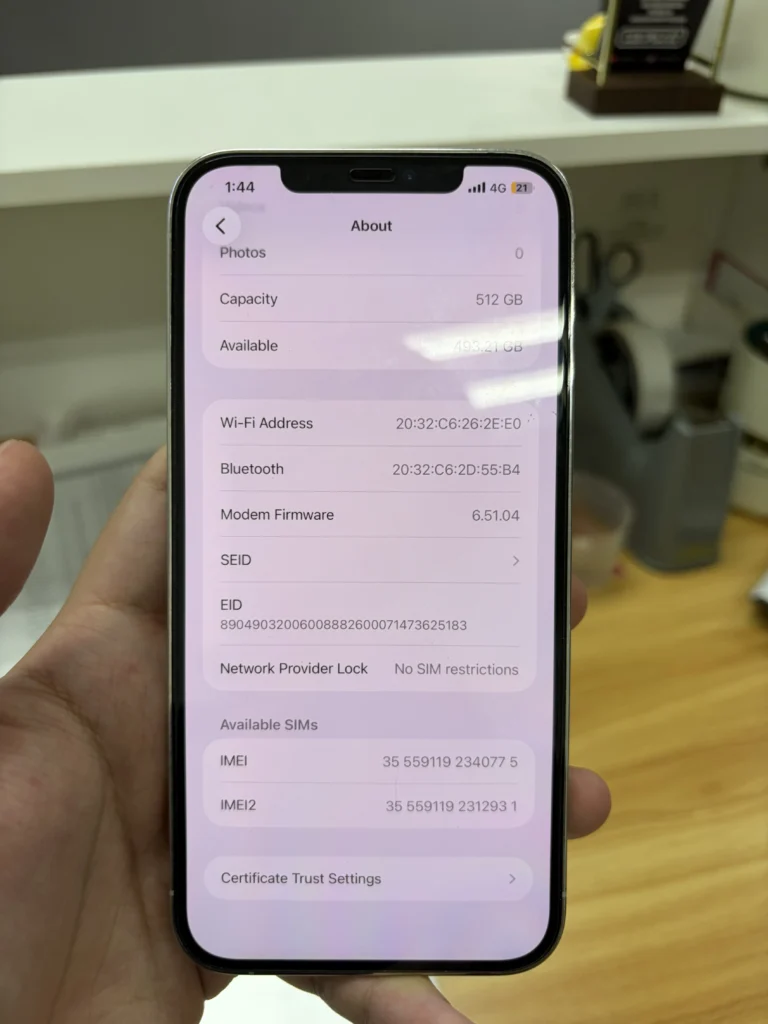
What Does No SIM Restrictions Mean?
When an iPhone shows No SIM restrictions, it means the phone is not locked to one carrier. For customers in Malaysia, this usually means the iPhone should be able to accept compatible local SIM cards, as long as there is no separate network, account, blacklist, eSIM, or hardware problem.
This is the status many customers want when they want a foreign iPhone to work with Malaysia SIM cards and many compatible carriers. In practical terms, it means the iPhone is no longer limited by the previous carrier lock. Actual coverage still depends on the iPhone model, supported network bands, local telco coverage, SIM plan, and carrier rules in each country.
When Should You Bring a SIM Locked iPhone to MobiLab?
You should ask for a check if your iPhone has any of these symptoms:
- The iPhone is from the US, Japan, Europe, or another overseas market
- The iPhone is an LL set or US set and cannot use a Malaysia SIM card
- Settings shows SIM locked or Carrier Lock: SIM locked
- The phone works on Wi-Fi but has no normal mobile network
- You inserted a Malaysian SIM but the iPhone does not get service
- You bought a second-hand foreign iPhone and want to check the lock status
- You want the iPhone to work with Malaysia SIM cards before using it daily
See our SIM unlock assessment service for supported-device checking in Kuala Lumpur. A phone imported from another country is not necessarily locked, so confirm the status before paying for any service.
iPhone Carrier-Lock Assessment at Wisma Cosway
MobiLab is a phone repair specialist serving customers in Kuala Lumpur and Selangor. Visit MobiLab at Lot 1.91, First Floor, Wisma Cosway, 88 Jalan Raja Chulan, Kuala Lumpur. We open Monday to Saturday, 11am–8pm, and close on Sunday. Check our Wisma Cosway address and opening hours.
Walk-in customers are welcome, and WhatsApp inquiries are also useful. If you WhatsApp MobiLab first, send the model and a cropped photo showing only the carrier lock status. Hide your serial number, IMEI and other personal details in initial screenshots. This helps MobiLab understand whether the phone is SIM locked, already unlocked, or affected by another network problem.
For customers buying a foreign iPhone, checking the SIM lock status before relying on the phone is always better than guessing. A quick diagnosis can save time, avoid wrong purchases, and help you decide whether the phone is worth unlocking.
FAQ
Can every SIM locked iPhone be unlocked?
Not always. The result depends on the model, carrier status, lock type, IMEI condition, and whether there are other account, blacklist, or hardware problems. MobiLab needs to check the actual phone before confirming whether the service is possible.
Is an LL set iPhone always SIM locked?
No. LL set means the iPhone is from the US market, but not every LL set is locked. Some are already unlocked and can use Malaysia SIM cards normally. The safest way is to check Settings > General > About and look at the carrier lock status.
Will SIM unlock make the iPhone usable in Malaysia?
If the SIM lock is the only issue and the unlock is successful, the iPhone should be able to use compatible Malaysia SIM cards. However, network band support, telco coverage, SIM plan, eSIM setup, and hardware condition can still affect usage.
Is SIM unlock the same as fixing no signal?
No. No signal can be caused by SIM lock, but it can also be caused by a faulty SIM tray, eSIM issue, antenna problem, baseband failure, motherboard fault, or telco coverage issue. MobiLab can check the phone first to identify the real cause.
Can I WhatsApp MobiLab before visiting?
Yes. Send a clear photo of the iPhone About screen, especially the Carrier Lock or Network Provider Lock section. MobiLab can advise whether it looks like a SIM locked case before you visit the Wisma Cosway shop.
Need Help With a SIM Locked Foreign iPhone in Malaysia?
If your foreign iPhone, LL set iPhone, or US set iPhone is SIM locked and cannot use Malaysian SIM cards, bring it to MobiLab for checking. The technician can inspect the carrier lock status, explain the possible options, and confirm whether the device is suitable for unlock service.
MobiLab assesses carrier-lock enquiries at Wisma Cosway, near Pavilion KL, with a clear explanation of eligibility and costs before service. You can ask MobiLab about your carrier lock status or visit the Wisma Cosway shop for checking.
Standard diagnosis is free. Any complex diagnostic work is quoted first and only proceeds with your approval. This assessment does not guarantee carrier approval or a successful unlock.